


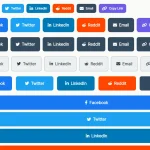
share-bar is a dependency-free JavaScript library to help you generate a customizable, themeable social share bar for your posts, articles, and pages.
Social networks supported:
- Google Plus
- Telegram
- And email
How to use it:
Insert the share.bar.css and share.bar.js into the html page.
<link rel="stylesheet" href="share.bar.css">
<script src="share.bar.js"></script>
Initialize the library and insert your own Facebook AppID:
new ShareBar({
    'facebookAppId': YOUR APP ID HERE
});
Create the social share bar on the page.
- data-url: URL to share
- data-title: title to share
- data-image-url: image to share
- data-hashtags: tags to share
- data-theme: dark, minimal or minimal-light
<div class="share-bar"
     data-url="https://cssscript.com"
     data-title="JavaScript and CSS"
     data-image-url="http://lorempixel.com/400/400/"
     data-hashtags="#javaScript #css">
</div>
All default configuration options to customize the social share bar.
// Selector to open lightbox
selector: '.share-bar',
campaign: 'share-bar',
classPopup: 'share-popup',
// Facebook App ID
facebookAppId: '',
networks: [
  FACEBOOK, TWITTER, WHATSAPP, GOOGLE, PINTEREST, EMAIL
],
// dark, minimal or minimal-light
theme: 'natural',
// social button options
buttonWidth: 34,
buttonFullWidth: 110,
buttonPadding: 4,
maxSocialButtons: 6,
// or 'mobile'
context: 'desktop',
// callbacks
onCreateBar: function (bar) { return false; },
onCreateButton: function (button) { return false; },
onShare: function (button) { return false; }
Changelog:
10/11/2018
- Keep selected network names in an activeNetworks instance var
See Also:
 Create Inline & Floating Social Share Bars With The Socializer.css
 Modern Social Share Buttons – Shareon.js
 Lightweight Social Sharing for Modern Sites – Social Share Buttons
 Floating Social Sharing Widget with Confetti Effects – SoMuchSharing
 Social Share Buttons Plugin with Custom Popup Support – UniversalShare
 Social Sharing Libraray For Popular Social Networks – Ensemble SocialShare
 Floating Social Share Bar In Pure JavaScript – Sharerbox
 Simplify Web Page Sharing With Share URL