


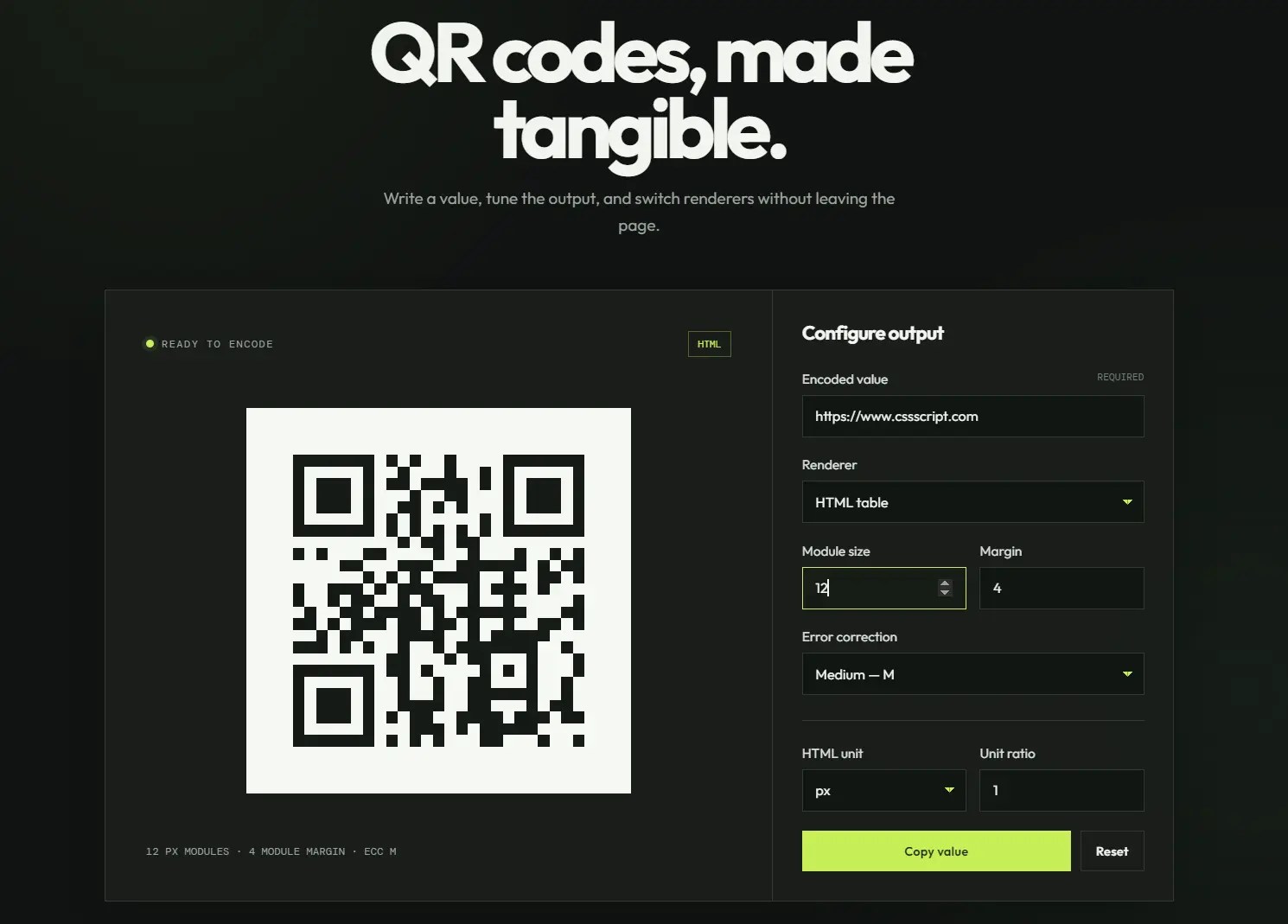
qr-code is an ultra-light Web Component that turns a single custom element into a working QR code.
Set a data attribute on <qr-code> and the component renders the encoded value as a PNG image, an HTML table, or an inline SVG you choose.
How To Use It:
Installation
Install the package through npm:
npm install webcomponent-qr-code
Version 2 is ESM-only and no longer includes a legacy ES5 build or precompiled dist bundle. Import it through a bundler or another environment that resolves npm package imports. The default import registers the <qr-code> custom element once it reaches the browser.
import 'webcomponent-qr-code';
Basic Usage
Add the custom element and place the encoded value in the data attribute:
<qr-code data="https://www.cssscript.com"></qr-code>
PNG is the default output format. The component renders an <img> inside its Shadow DOM.
Choose another format ( png, svg, and html.) through the format attribute:
<qr-code
  data="https://www.cssscript.com"
  format="svg">
</qr-code>
Attributes And Properties
data(string, defaultnull): Sets the text or URL stored in the QR code.format(png,svg, orhtml, defaultpng): Selects the rendered output type.modulesize(integer, default5): Sets the size of each QR module.margin(integer, default4): Sets the quiet-zone margin in QR modules.unit(string, defaultpx): Sets the CSS unit used by HTML table output.ratio(number, default1): Converts the module size to another unit for HTML table output.ecclevel(L,M,Q, orH, defaultL): Sets the error correction level.
The
unitandratioattributes apply only whenformat="html".
Updating The QR Code Dynamically
Set the data property when an application value changes. The component removes the previous output and immediately generates the replacement.
<qr-code id="order-code" format="svg"></qr-code>
const orderCode = document.querySelector('#order-code');
const orderId = 'ORD-73482';
orderCode.data = `https://example.com/orders/${orderId}`;
orderCode.ecclevel = 'M';
Configuring Size, Margin, And Error Correction
The following element generates an SVG QR code with larger modules, a six-module margin, and high error correction. Higher error correction preserves more encoded data when part of the code becomes damaged or obscured. It also produces a denser QR pattern for the same input.
<qr-code
  data="https://example.com/account/security"
  format="svg"
  modulesize="8"
  margin="6"
  ecclevel="H">
</qr-code>
Using CSS Units With HTML Output
HTML output renders the QR code as a table. The unit and ratio attributes convert the pixel-based module size to another CSS unit.
<qr-code
  data="https://example.com/profile"
  format="html"
  modulesize="5"
  unit="rem"
  ratio="0.0625">
</qr-code>
Registering A Custom Element Name
Import the component class directly when the default <qr-code> tag conflicts with another custom element or project naming convention.
import QRCode from 'webcomponent-qr-code/qr-code';
if (!customElements.get('support-qr')) {
  customElements.define('support-qr', QRCode);
}
Use the new element name in your markup:
<support-qr
  data="https://example.com/support"
  format="svg">
</support-qr>
Do not register the same class under the default name after importing the package entry point.
Styling And Customization
The generated output is contained within the Shadow DOM. Standard descendant selectors cannot reach it. Use the exposed CSS parts that match the selected format:
/* PNG output */
qr-code::part(img) {
  display: block;
  border: 8px solid #fff;
  border-radius: 8px;
}
/* SVG output */
qr-code::part(svg) {
  display: block;
  padding: 8px;
  background: #fff;
  border-radius: 8px;
}
/* HTML table output */
qr-code::part(table) {
  border-collapse: collapse;
}
The available part names are:
imgfor PNG output.svgfor SVG output.tablefor HTML output.
Styles applied to the host element remain useful for outer spacing, layout, borders, and backgrounds:
qr-code {
  display: inline-block;
  padding: 1rem;
  background: #f4f4f4;
  border-radius: 12px;
}
Alternatives:
- Decoding/Encoding QR Code With Pure JavaScript
- Flexible Client-side QR Code Generator
- QR Code Generator With Logo And Title Support
- Customizable QR Code Generator In Vanilla JavaScript
- SVG QR Code Generator In JavaScript
See Also:
 SVG Based QR Code Generator – QRcode.js
 qrGrid: Custom QR Code Generator with Logos and Gradients
 Decoding/Encoding QR Code With Pure JavaScript
 Flexible Client-side QR Code Generator
 Headless QR Code Generator In JavaScript
 Online QR Code Reader With Pure JavaScript – qrcode-parser
 Space-saving QR Code Generator – qrize.js
 QR Code Generator With Logo And Title Support – EasyQRCodeJS