


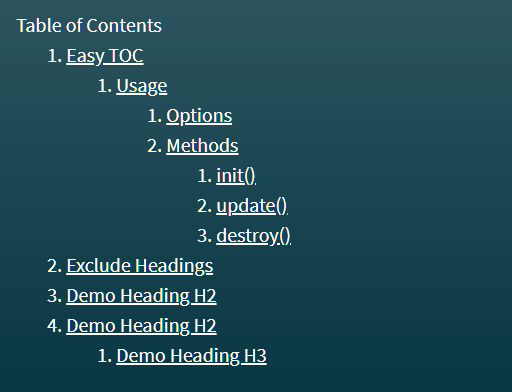
A lightweight and easy table of contents plugin to generate a hierarchical in-page navigation for a long webpage sectioned by heading elements.
Written in Vanilla JavaScript, without any dependencies, and is only 3.44KB and 1.37KB gzipped.
How to use it:
1. Place the minified version of the easy-toc plugin in the HTML.
<script src="./dist/easy-toc.min.js"></script>
2. Add the data-no-toc attribute to heading elements that should be ignored.
<h4 data-no-toc>This Heading will be excluded</h4>
3. Create a container to place the table of contents.
<div class="toc-wrapper">
  <div class="toc-header">Table of Contents</div>
</div>
4. Initialize the easy-toc plugin and you’re done.
let mytoc = new easy_toc( document.querySelector('.toc-wrapper'), {
    // options here
});
mytoc.init();
5. Determine an array of heading elements to be included. Default: ['h1', 'h2', 'h3', 'h4', 'h5', 'h6'].
let mytoc = new easy_toc( document.querySelector('.toc-wrapper'), {
    include: ['h1', 'h2', 'h3']
});
6. Enable or disable the hierarchical structure. Default: true.
let mytoc = new easy_toc( document.querySelector('.toc-wrapper'), {
    hierarchical: false
});
7. Customize the anchor attached to the heading elements.
let mytoc = new easy_toc( document.querySelector('.toc-wrapper'), {
    prefix: 'easy_toc_',
    anchor_nodename: 'div',
    anchor_class: 'anchor'
});
8. API methods.
// update the TOC
mytoc.update();
// destroy the TOC
mytoc.destroy();
See Also:
 Create ChatGPT-Style Side Navigation Using the table-of-content Component
 Create Dynamic Navigation Menus (TOC) for Long Content – Anchor.js
 Highly Customizable Table Of Contents Generator – Tocbot
 Floating Table Of Contents In JavaScript – Ootliner
 Collapsible Side Table Of Contents In JavaScript – DocumentOutline
 Minimal Table of Contents Generator In JavaScript – Tocbase
 Generate List Based Table Of Contents For Long Document – html-contents
 Basic Table Of Contents Generator In JavaScript – table-of-contents.js