


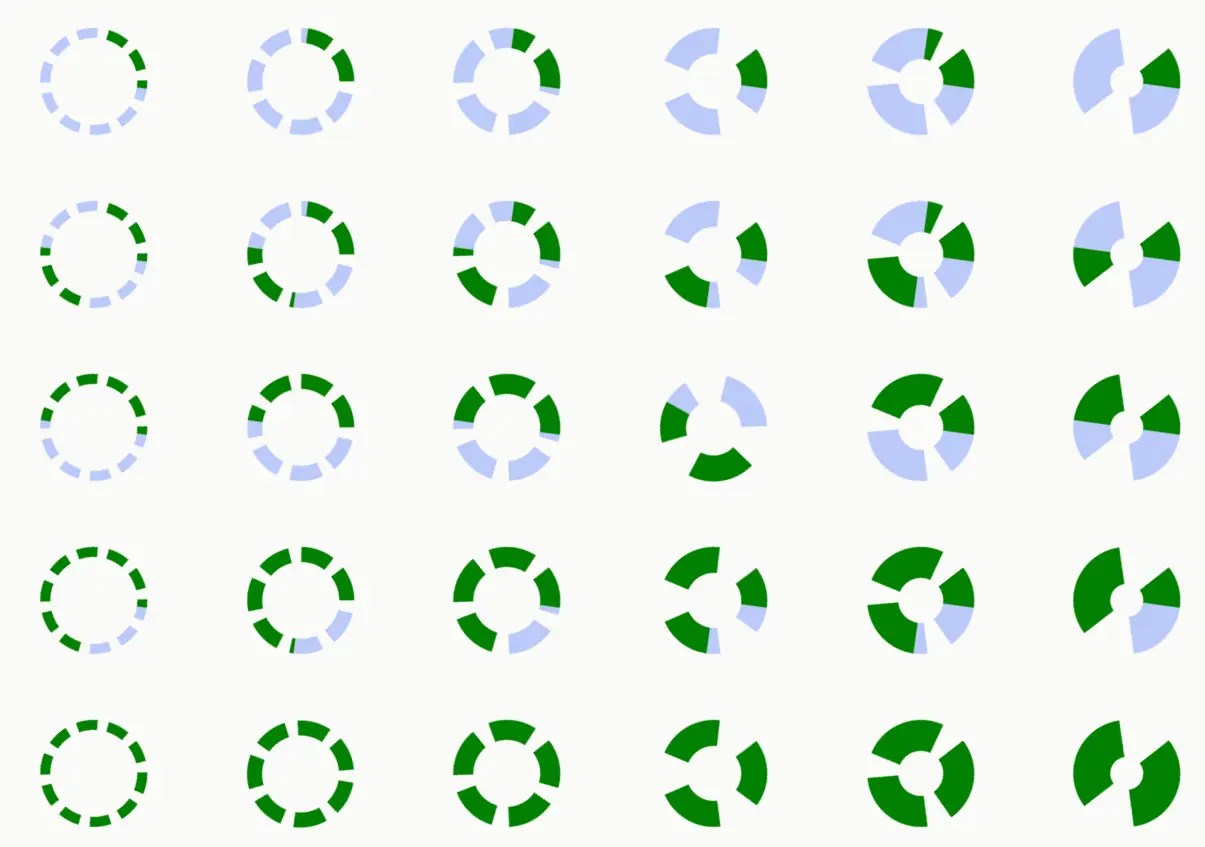
SpinnerComponent is a JavaScript library that provides a <x-spinner /> web component for displaying animated, accessible, customizable loading spinners in HTML documents.
It allows you to control every aspect of your spinner’s appearance and behavior directly through HTML markup or programmatically using Javascript.
The core of SpinnerComponent lies in its JavaScript class, SpinnerElement, which extends the HTMLElement interface. This class encapsulates the spinner’s functionality and rendering logic.
The SpinnerElement class uses the Shadow DOM to isolate its internal structure and styling from the main document. It utilizes CSS animations to create the spinning effect and provides methods to control the animation’s state (e.g., run, pause, stop).
How to use it:
1. Downloading the spinnerComponent.js script and load it into your HTML document:
<script src="/path/to/spinnerComponent.js"></script>
2. Insert <x-spinner /> custom element where you want the spinner to appear:
<x-spinner></x-spinner>
3. Customize the spinner using the following attributes:
- speed: Controls the animation speed.
- rotor: Defines the visual form of the rotor (e.g., 1, 11, 101, 111, 1111).
- dir: Sets the direction of spin (cw for clockwise, ccw for counter-clockwise).
- rotor-style: Defines the appearance of the rotor using CSS border types (solid, dotted, dashed, double, ridge, groove, inset, outset).
- weight: Sets the thickness of the rotor and trace.
- color: Sets the color of the spinner’s rotor.
- trace-color: Sets the color of the spinner’s trace.
- background-color: Sets the background color within the spinner’s border.
- back-color: Sets the background color for the entire tag, including padding and rounded corners.
- prefix/suffix: Adds text or HTML elements before/after the spinner.
- kern: Adds right and left kerning to the spinner.
- rotor-status: Indicates the current status. “running”, or “paused”
- aria-wrap, aria-role, aria-label, aria-labelledby, aria-description, aria-busy, aria-live, aria-atomic, aria-relevant: ARIA attributes for accessibility.
<x-spinner
  speed=".75"
  rotor="1110"
  direction="cw"
  rotor-style="dotted"
  weight=".15"
  color="#0000ff"
  trace-color="transparent"
  background-color="#ccccff"
  back-color="#ccccff"
  prefix="Loading "
  suffix=" CSSScript"
  kern="2ch"
  rotor-status="paused"
  >
</x-spinner>
4. You can also create and control spinners programmatically using JavaScript. Use the SpinnerElement constructor to create a new spinner instance, and then utilize its methods and properties:
const ele = document.getElementById('myEle');
const mySpinner   = new SpinnerElement;
mySpinner.setAttribute('speed','1.5');
ele.appendChild(sp);
mySpinner.setAttribute('color','turquoise');
mySpinner.style['font-size'] = '1.5em';
// more attributes and styles here
5. More utility functions:
// returns the spinner
getSpinner(object/id/name/class)
// returns an array of the spinner objects found
getSpinners(object/id/name/class/'x-spinner')
// create a new custom spinner
createSpinnerElement('css-script-spinner', {
  speed: '.5',
  dir: 'ccw',
  // more options here
})
<css-script-spinner></css-script-spinner>
6. More API methods.
// set attributes & styles
mySpinner.setAttributes({
  // attributes here
});
mySpinner.setStyle({
  // styles here
});
mySpinner.setRotor('dotted');
mySpinner.setWeight('3');
mySpinner.setPrefix('Loading... ');
mySpinner.setSuffix(' Something');
// start
mySpinner.run();
// resume
mySpinner.go();
// pause
mySpinner.pause();
// stop
mySpinner.stop();
// stop resume
mySpinner.stopGo();
// show
mySpinner.show();
// hide
mySpinner.hide();
// changes the spinner's style.visibility property to 'hidden'
mySpinner.veil();
// changes the spinner's style.visibility property to 'visible'
mySpinner.unveil();
// Returns a string encompassing the entire shadow DOM fragment of the spinner
mySpinner.toString();
See Also:
 Immersive 3D Auto-Rotating Image Gallery With JavaScript & CSS3
 Animated Notification Dialog In JavaScript – notification.js
 JavaScript Library To Change Image Source Based On Viewport Size – Dynamic Image
 COVID-19 (Coronavirus Disease) Spreading Simulation Tool In JavaScript
 Generate SVG-based Flowcharts From JSON Data – jsontr.ee
 Create Pagination And Filter For HTML Table – Ligne PaginateJs
 Build Modern Accessible Circular Menus with Pure CSS – Radial Menu
 Minimal Canvas Based Column Chart Library – bar-js