


SimpleStarRating.js is a lightweight JavaScript library used for generating a simple, easy-to-customize star rating system without any 3rd dependencies and icon fonts.
How to use it:
Place the SimpleStarRating.css and SimpleStarRating.js into your html page as follows:
<link rel="stylesheet" href="SimpleStarRating.css">
<script src="SimpleStarRating.js"></script>
Create an empty element to place the star rating system.
<span class="rating"></span>
You can also specify the initial rating value using ‘data-default-rating’ attribute.
<span class="rating" data-default-rating="2.5"></span>
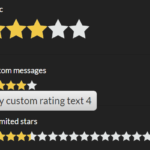
Initialize the star rating system. It will render a basic 5 star rating system inside the element you just created.
var ratings = document.getElementsByClassName('rating');Specify the number of rating stars you want to use.
<span class="rating" data-stars="10"></span>
Style the rating stars.
.rating {
  ...
}
API methods.
- disable: Disables the rating from being changed
- enable: Reenables interactivity
- setCurrentRating: Changes the current (user-selected) rating (data-rating) and displays it
- setDefaultRating: Changes the default rating (data-default-rating) and displays it
See Also:
 Interactive Star Rating Component With Pure JavaScript – rater-js
 Five-Star Rating Web Component in JavaScript
 Select Box Based Star Rating JavaScript Library – star-rating.js
 Customizable 5-Star Rating System In Pure CSS/SCSS
 CSS Only Animated Rating Bar
 Tiny Star Rating System In Vanilla JavaScript
 Accessible Star Rating Control Using Radio Buttons
 Pure JavaScript Star Rating Library – JavaScript-Rating
It all looks good. What do you mean by “initialize the star rating system?”
The Rating Plugin is very useful!…
Nice Work!…
It isn’t mentioned, by some strange reasons, but to initialize it you should write:
var ratings = document.getElementsByClassName(‘rating’)[0];
SimpleStarRating(ratings);
author’s example can’t work.