


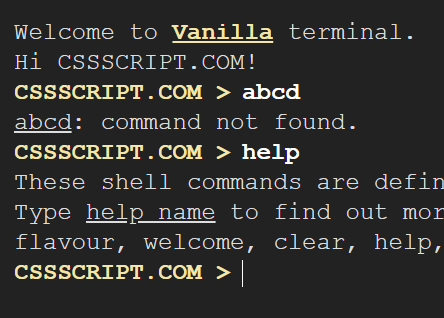
A lightweight cross-platform terminal emulator written in vanilla JavaScript without any dependencies.
Supports desktop/tablet/mobile and you can define your own shell commands in the JavaScript.
How to use it:
Create a container to place your terminal.
<div id="vanilla-terminal"></div>
Download and place the JavaScript ‘vanilla-terminal.js’ right before the closing body tag.
<script src="/path/to/vanilla-terminal.js"></script>
Create a new terminal instance inside the container you created.
const myTerminal = new VanillaTerminal();
Add your own shell commands to the terminal.
const myTerminal = new VanillaTerminal({
      commands: {
        flavour: (myTerminal) => {
          myTerminal.output('...')
          myTerminal.setPrompt('...');
        },
        ping: (myTerminal, parameters) => {
          myTerminal.output('Ping to <u>${parameters[0]}</u>...');
        },
      },
});
More configuration options.
const myTerminal = new VanillaTerminal({
// target container
container: 'vanilla-terminal'
// welcome message
welcome: 'Welcome to <a href="">Vanilla</a> terminal.',
// prompt message
prompt: '',
// custom separator
separator: '>'
});API methods.
// clear
myTerminal.clear();
// output
myTerminal.output('Text to output.');
// prompt
myTerminal.prompt('Type your name', (name) => {
  myTerminal.output(`Hi ${name}!`);
});
// onInput
myTerminal.onInput((command, parameters) => {
  console.log('⚡️onInput', command, parameters);
});
// set prompt
myTerminal.setPrompt('Text Here');
Changelog:
06/22/2019
- New method idle()
See Also:
 Retro Amber-terminal CSS Framework – Amber Console
 Terminal-Inspired CSS Library for Retro Web UI – WebTUI
 Terminal Style CSS Framework – terminal.css
 Build Terminal UI with Terminal.css CSS Framework
 Emulating A Shell Environment With The ttty.js Library
 Create Custom Terminals With Pure JavaScript And CSS – shell.js
 Vanilla JavaScript Shell Terminal Emulator With Async/Await Functions – jsShell.js
 Minimal Interactive Terminal In JavaScript – Terminal.js