


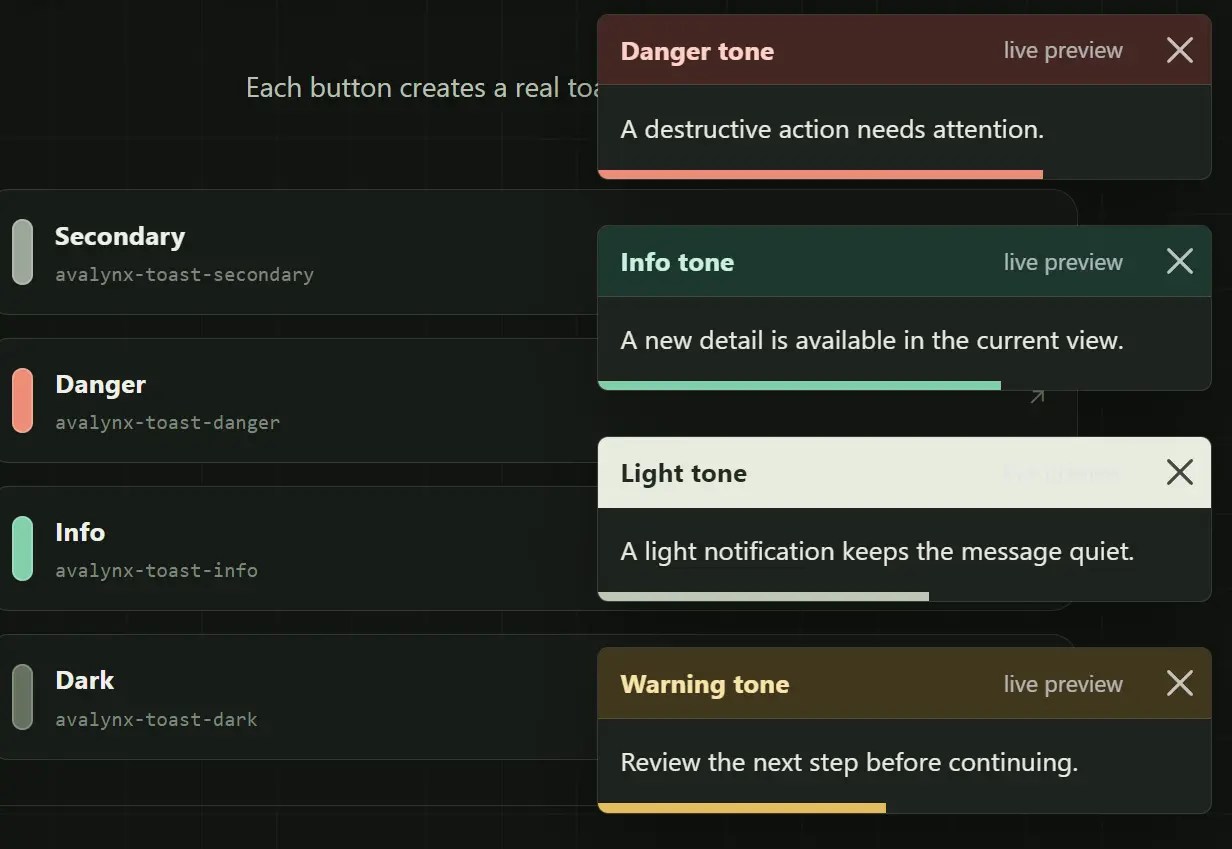
AvalynxToast is a vanilla JavaScript toast notification library for your Bootstrap 5 web projects.
It supports success, danger, warning, info, and other Bootstrap status types across 6 screen positions, with HTML content and timed or persistent dismissal.
You can use it for programmatically generated notifications in projects where no prebuilt toast markup is required.
Features
- 8 Bootstrap status color types.
- 6 fixed screen positions.
- Optional title, subtitle, and header image.
- Body-only mode for compact messages.
- Timed dismissal with an animated timer bar.
- Persistent notifications with manual dismissal.
- Configurable notification container width.
- Callback after dismissal.
How To Use It
Installation
Load the latest Bootstrap 5 framework first, followed by the AvalynxToast stylesheet and JavaScript.
<link
  href="https://cdn.jsdelivr.net/npm/bootstrap/dist/css/bootstrap.min.css"
  rel="stylesheet"
>
<script src="https://cdn.jsdelivr.net/npm/bootstrap/dist/js/bootstrap.bundle.min.js"></script>
<link
  href="/dist/css/avalynx-toast.css"
  rel="stylesheet"
>
<script src="/dist/js/avalynx-toast.js"></script>
Or install the package via NPM and import the ESM build into your project.
npm install avalynx-toast
import 'bootstrap/dist/css/bootstrap.min.css';
import { AvalynxToast } from 'avalynx-toast';
import 'avalynx-toast/dist/css/avalynx-toast.css';
Basic Usage
Create a notification with a message and specify a status type: primary, secondary, success, danger, warning, info, light, and dark
// new AvalynxToast(message, type, options);
new AvalynxToast(
  'Settings saved.',
  'success'
);
Add A Title, Subtitle, And Image
Header content accepts a title, secondary text, and image URL.
new AvalynxToast(
  'A new comment was posted on your project.',
  'info',
  {
    title: 'New comment',
    subtitle: 'Just now',
    image: '/images/profile-avatar.jpg',
    duration: 6000,
    position: 'top-right'
  }
);
Create A Body-Only Toast
Set headerless to true to remove the toast header.
new AvalynxToast(
  'Connection restored.',
  'success',
  {
    headerless: true,
    duration: 3500,
    position: 'bottom-center'
  }
);
Keep A Toast Open
Set autohide to false for a notification that should wait for manual dismissal.
new AvalynxToast(
  'The upload failed. Check your connection and try again.',
  'danger',
  {
    title: 'Upload error',
    autohide: false,
    closeable: true,
    position: 'top-center'
  }
);
Run Code After Dismissal
onClose runs after Bootstrap finishes hiding the toast.
new AvalynxToast(
  'Draft removed.',
  'warning',
  {
    duration: 4000,
    onClose: function () {
      console.log('Toast removed from the page.');
    }
  }
);
All Configuration Options
title(string): Header title. Default is''.subtitle(string): Secondary header text displayed after the title. Default is''.image(string): Image URL displayed before the title. Default is''.headerless(boolean): Removes the normal header. Default isfalse.duration(number): Auto-hide delay in milliseconds. Default is5000.position(string): Position container location (top-left,top-center,top-right,bottom-left,bottom-center,bottom-right). Default is'top-right'.closeable(boolean): Controls the close button whenautohideisfalse. Default istrue. Auto-hiding toasts always receive a close button.autohide(boolean): Hides the toast afterduration. Default istrue.width(string): Maximum width assigned when the position container is first created. Default is'350px'.onClose(function): Runs after the toast is hidden. Default isnull.
Styling And Customization
AvalynxToast uses Bootstrap status variables for its header and timer colors. Override the generated classes in your own stylesheet when your project needs different colors.
.avalynx-toast.avalynx-toast-success .toast-header {
  color: #14532d;
  background-color: #ecfdf3;
}
.avalynx-toast.avalynx-toast-success .avalynx-toast-timer {
  background-color: #16a34a;
}
Alternatives
- Create Bootstrap 5 Toasts Dynamically – bootstrap-show-toast
- Customizable Toast Notification Manager For Bootstrap 5 – use-bootstrap-toaster
- Add Custom Stackable Toast Alerts To Your Bootstrap Projects With Bootstrap Toaster
- Use JavaScript To Dynamically Create Bootstrap 5 Toasts – b5toast.js
FAQs
Q: Does AvalynxToast work without Bootstrap?
A: No. AvalynxToast requires Bootstrap 5.3 or newer. The browser build calls Bootstrap’s Toast API directly.
Q: Why does a close button appear when closeable is false?
A: autohide: true forces closeable to true. Set autohide: false when the toast must have no close button.
Q: Why does changing width have no effect on a later toast?
A: Toasts at one position reuse an existing container. Its maximum width comes from the first toast that created that position container.
Q: Can the message contain HTML?
A: Yes. AvalynxToast inserts message through innerHTML. Sanitize untrusted content before passing it to the constructor.
Q: What ARIA attributes does AvalynxToast add?
A: The toasts use role="alert", aria-live="assertive", and aria-atomic="true".
See Also:
 Advanced Alert Notification System For Bootstrap 5 – AvalynxAlert.js
 Add Custom Stackable Toast Alerts To Your Bootstrap Projects With Bootstrap Toaster
 Customizable Toast Notification Manager For Bootstrap 5 – use-bootstrap-toaster
 Use JavaScript To Dynamically Create Bootstrap 5 Toasts – b5toast.js
 Create Bootstrap 5 Toasts Dynamically – bs-toaster
 Custom Bootstrap 5 Toast Generator In JavaScript – bs5-toast
 Advanced Toast & Snackbar Library Based On Bootstrap 5 – Toaststrap
 Searchable, Sortable, AJAX Data Tables for Bootstrap 5 – AvalynxDataTable