


Bordex is a JavaScript library that adds customizable border styles to HTML elements.
This library minimizes the need to write custom CSS for border styling. Users can apply complex border effects by calling specific functions with customizable parameters.
Border Styles Included:
How to use it:
1. Install & download.
npm install bordex
2. Import the desired border functions:
// ES Module
import {
  addBlurBorder,
  addCornerBorder,
  addDisjointedBorder,
  addFancyBorder,
  addGradientBorder,
  addInsetBorder,
  addOverlapBorder,
  addStripeBorder,
  addThinBorder,
  addGenericBorderr
} from 'bordex';
// Browser
<script type="module">
import {
addBlurBorder,
addCornerBorder,
addDisjointedBorder,
addFancyBorder,
addGradientBorder,
addInsetBorder,
addOverlapBorder,
addStripeBorder,
addThinBorder,
addGenericBorderr
} from 'https://unpkg.com/bordex@latest/dist/index.js';
</script>3. Creates a soft, blur-like border effect.

const element = document.getElementById("my-element");
addBlurBorder(element, {
  borderColor: "#3498db",  // Sets border color
  borderWidth: "20px"      // Sets blur width
});
4. Adds borders to the four corners of an element.

const element = document.getElementById("my-element");
addCornerBorder(element, {
  borderWidth: "2px",
  borderColor: "#2ecc71",
  borderStyle: "solid"
}, "additional-cssClass");
5. Creates a border with intentional breaks or gaps.

addDisjointedBorder(element, {
  angle: "90deg",
  borderColor: "#e74c3c"
}, "additional-cssClass");
6. Add decorative border styles to elements.

addFancyBorder(element, {
  borderColor: "#9b59b6",
  borderWidth: "3px",
  borderStyle: "solid"
}, "additional-cssClass");
7. Create a border with color gradients.
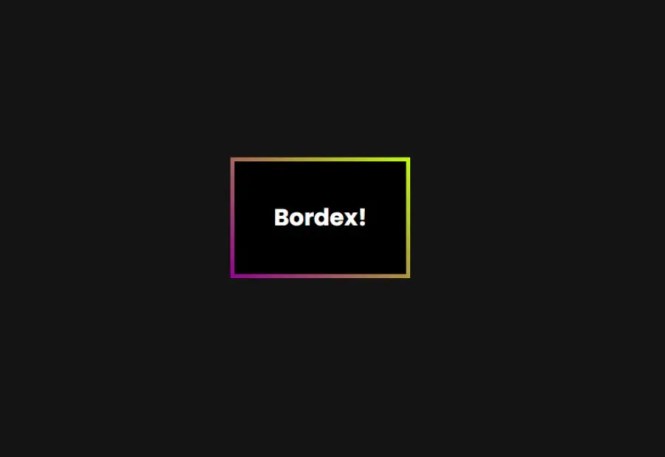
addGradientBorder(element, {
  angle: "45deg",
  colors: ["#3498db", "#2ecc71"],
  borderWidth: "4px"
}, "additional-cssClass");
8. Create a border that appears inset into the element.
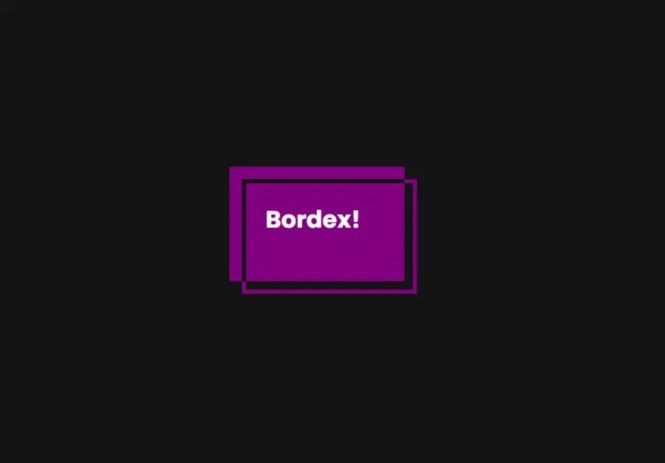
addInsetBorder(element, {
  borderOffset: "15px",
  borderWidth: "2px",
  borderStyle: "solid"
}, "additional-cssClass");
9. Create overlapping border effects.

addOverlapBorder(element, {
  borderColor: "#f1c40f",
  borderWidth: "2px",
  borderStyle: "solid",
  borderTopWidth: "4px",    // Optional: specific side width
  borderLeftWidth: "4px"    // Optional: specific side width
}, "additional-cssClass");
10. Creates alternating striped border patterns.

addStripeBorder(element, {
  stripeWidth: "10px",
  borderWidth: "20px",
  colors: ["#3498db", "#2ecc71", "#e74c3c"]
}, "additional-cssClass");
11. Add a thin border to specific sides.

addThinBorder(element, {
  color: "#95a5a6",
  side: "left",        // Options: top, right, bottom, left, horizontal, vertical
  outset: "5px"
}, "additional-cssClass");
12. Add a glowing gradient border to the element.
addGlowingGradientBorder(element, {
  background: `linear-gradient(${angle},${colors.join(', ')})`,
  position: 'absolute',
  inset: '0',
  zIndex: '-1',
  filter: `blur(${GRADIENT_BORDER_BLUR})`,
}, "additional-cssClass");
13. Apply basic border styles with customization.

addGenericBorder(element, "dotted", {
  borderColor: "#34495e",
  borderWidth: "2px"
});
Changelog:
v0.2.0 (11/18/2024)
- add a new function addGlowingGradientBorder that will add a glowing gradient border to the element.
v0.1.4 (11/06/2024)
- Bugfixed
See Also:
 Animated Gradient Border In Pure CSS
 Canvas Based Beveled Corners With JavaScript – Chamfer.js
 Responsive Adaptive Slider/Carousel with Vanilla JS – No jQ Slider
 Load Youtube Video Only When Needed – Youtube LazyLoad
 Cyberpunk 2077 Style Glitch Button In Pure CSS
 Awesome File Drop JavaScript Library – droppable
 Vanilla JavaScript Table Enhancement: Search, Sort, Paginate
 Lightweight Mobile-compatible Custom Scrollbar Library – letmescroll.js