


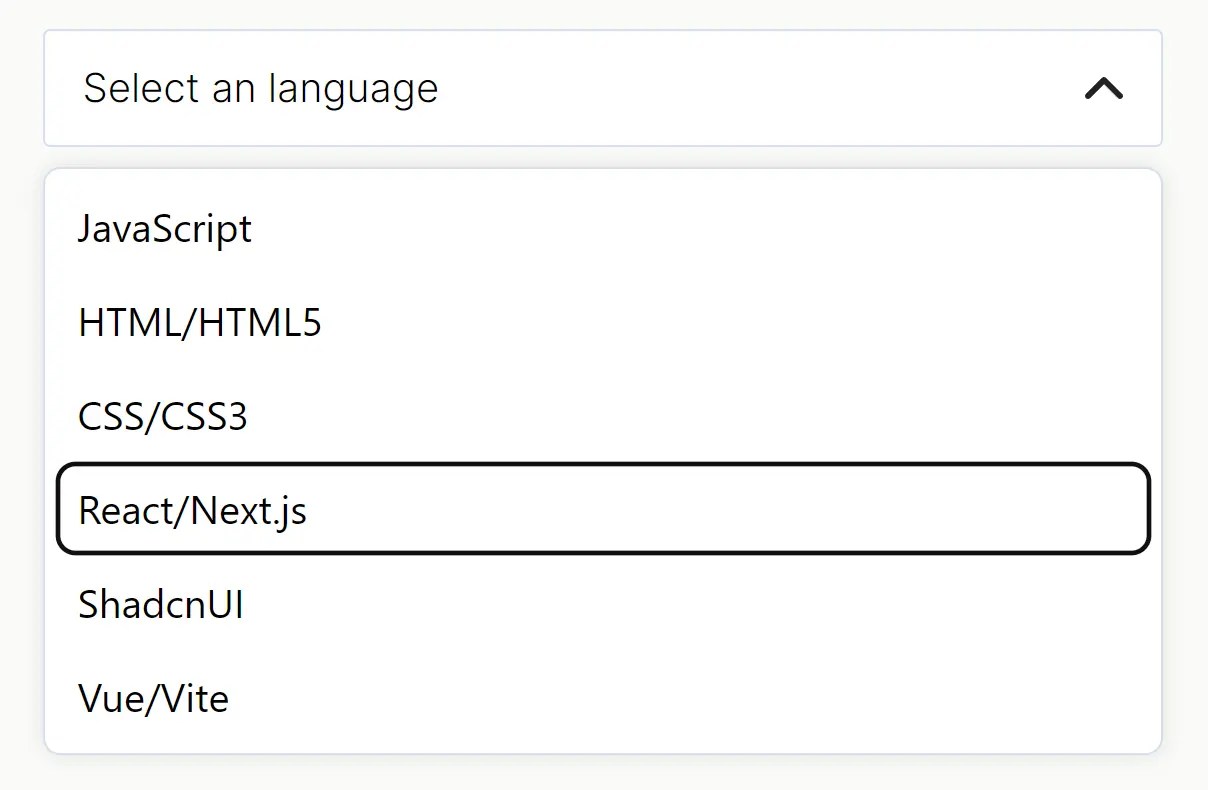
Simple Select is a lightweight custom select JavaScript library that transforms regular HTML lists into highly customizable and fully accessible dropdowns.
Features
- No external dependencies. Just vanilla JS and CSS.
- Provides structure and basic behavior, but zero styling opinions. You control the look entirely.
- Uses straightforward CSS classes (
simple-select-trigger,simple-select-dropdown,simple-select-option) for easy targeting. - Built with proper ARIA attributes and keyboard navigation support.
- Drop it into any vanilla JS project. No build tools or specific frameworks required.
How to use it:
1. Grab the minified CSS and JS files from the package and link them in your HTML:
<link rel="stylesheet" href="simple-select.min.css" />
<script src="simple-select.min.js"></script>
2. Wrap your HTML list in a div with the class simple-select.
<div class="simple-select">
  <!-- The Trigger Button -->
  <div
    tabindex="0"
    role="combobox"
    aria-haspopup="listbox"
    aria-expanded="false" <!-- JS toggles this -->
    class="simple-select-trigger"
  >
    <span class="simple-select-selected">Select an language</span>
  </div>
  <!-- The Dropdown List -->
  <ul role="listbox" class="simple-select-dropdown">
    <li role="option" class="simple-select-option" data-value="opt1">JavaScript</li>
    <li role="option" class="simple-select-option" data-value="opt2">HTML5</li>
    <li role="option" class="simple-select-option" data-value="opt3">CSS3</li>
    <!-- Add more options as needed -->
  </ul>
</div>
3. By default, the text inside .simple-select-selected updates when you pick an option. Set data-update-label-on-select="false" on the main .simple-select div if you want to handle the label update yourself (e.g., maybe you just want an icon, or you update it via other JS logic).
<div class="simple-select" data-update-label-on-select="false">
  ...
</div>
4. Get the selected value using the ‘select’ event.
// Target your specific select
const mySelect = document.querySelector('.simple-select');
mySelect.addEventListener('select', function(event) {
  // event.detail.value contains the data-value of the selected option
  console.log('Selected value:', event.detail.value);
});
The value comes from the data-value attribute on the selected <li>. If you omit data-value, it falls back to the textContent of the list item. For predictable data handling, I recommend always using data-value.
5. The library itself adds minimal base styles (mostly for positioning/hiding the dropdown). You’ll want to target .simple-select-trigger, .simple-select-dropdown, and .simple-select-option to match your design.
.simple-select-trigger {
  /* your styles here */
}
.simple-select-trigger:after {
  /* your styles here */
}
.simple-select-trigger:hover {
  /* your styles here */
}
.simple-select-trigger:focus {
  /* your styles here */
}
.simple-select-dropdown {
  /* your styles here */
}
.simple-select-option {
  /* your styles here */
}
.simple-select-option:hover {
  /* your styles here */
}
.simple-select-option.simple-select-selected {
  /* your styles here */
}
6. Control whether the trigger button text updates on selection.
<div class="simple-select" data-update-label-on-select="false">
</div>
Comparison with Alternatives
- Native
<select>: The browser default. Always available, requires no JS for basic use. The big downside is styling – it’s notoriously difficult and inconsistent across browsers. Simple Select wins easily if you need custom styling. - Choices.js: A more feature-rich library. It offers searching/filtering, multiple selections, asynchronous data loading, and more. It’s excellent but also larger and more complex. If you need those advanced features, Choices.js is a strong contender. If you just need a simple, styleable dropdown, Simple Select is much lighter.
- Select2: Another popular and feature-packed library, historically dependent on jQuery but newer versions might be standalone. Similar to Choices.js, it offers many features beyond a basic dropdown. If you’re already using jQuery or need its extensive features/theming, it’s an option. For vanilla JS projects prioritizing minimal footprint, Simple Select is more direct.
Changelog:
v1.0.9 (06/11/2025)
- Allow trigger to be an input
v1.0.8 (05/20/2025)
- Change z-indexes
v1.0.7 (05/17/2025)
- Added support for data-update-label-on-select attribute to control whether the trigger button text updates on selection
See Also:
 Tagging & Searchable Dropdown with Multi-Select – Searchdown.js
 Bootstrap 5 Select Dropdown Enhancer – AvalynxSelect
 Fast Touch-Friendly Picker Library for JavaScript & React – Quickpick UI
 Powerful Single & Multiple Select Library – tail.select
 Advanced Select Boxes For Bootstrap 5 With use-bootstrap-select
 Restyle and Enhance Native Select Boxes with Select.js
 Pretty Accessible Custom Select Box Library – EasyDropDown
 Bootstrap Style Searchable Dropdown Plugin – fstdropdown