


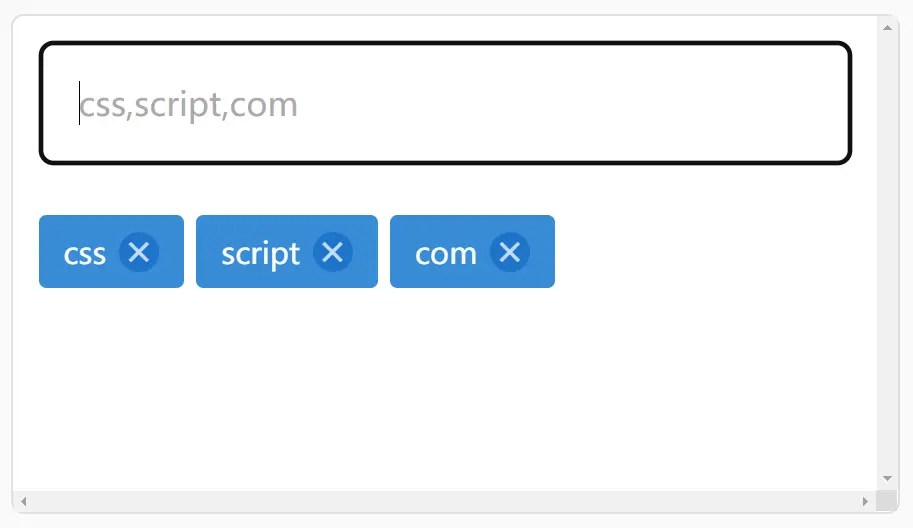
Tags Editor is a simple, fast, lightweight, dynamic tags input built with Vanilla JavaScript.
Feel free to download and use it in your next project to tag articles, products, or blog posts correctly and completely.
How to use it:
1. Install & download.
# NPM
$ npm i tags-editor
2. Import the Tags Editor.
<script src="./dist/bundle.js"></script>
3. Transform an empty DIV element into a basic tags input using the ‘data-tags-editor’ attribute:
<div data-tags-editor>
</div>
4. Predefine tags using the ‘data-tags-list’ attribute.
<div data-tags-editor data-tags-list="css,script,com">
</div>
5. Specify the placeholder of the tags input.
<div data-tags-editor data-tags-placeholder="Type something...">
</div>
6. Create a tags input dynamically.
window.__tagsEditor.initializeEditor(element);
7. Get the selected tags.
document
  .querySelectorAll('[data-tags-editor]')
  .forEach(editor =>
    editor.addEventListener('updateTagsList', e => console.log(e.detail.tagsList)
  )
);
8. Get the removed tags.
document
  .querySelectorAll('[data-tags-editor]')
  .forEach(editor =>
    editor.addEventListener('removedTag', e => console.log(e.detail.tagValue)
  )
);
See Also:
 Customizable Select Box & Input Field Enhancement Library – Choices.js
 Easy Tags Input Component For Bootstrap 5/4 – Tags.js
 Lightweight Tag Input Component with Autocomplete – input-tags-js
 Create Filterable Tags Input UI with outside-tags-selector
 Simple Tags Input With Autocomplete Support
 Minimal Tagging Input In Pure JavaScript – Tagger
 Customizable Tag/Chip Style Inputs For Bootstrap 5 – use-bootstrap-tag
 Multi-select Dropdown Component With Vanilla JavaScript – sellect.js