


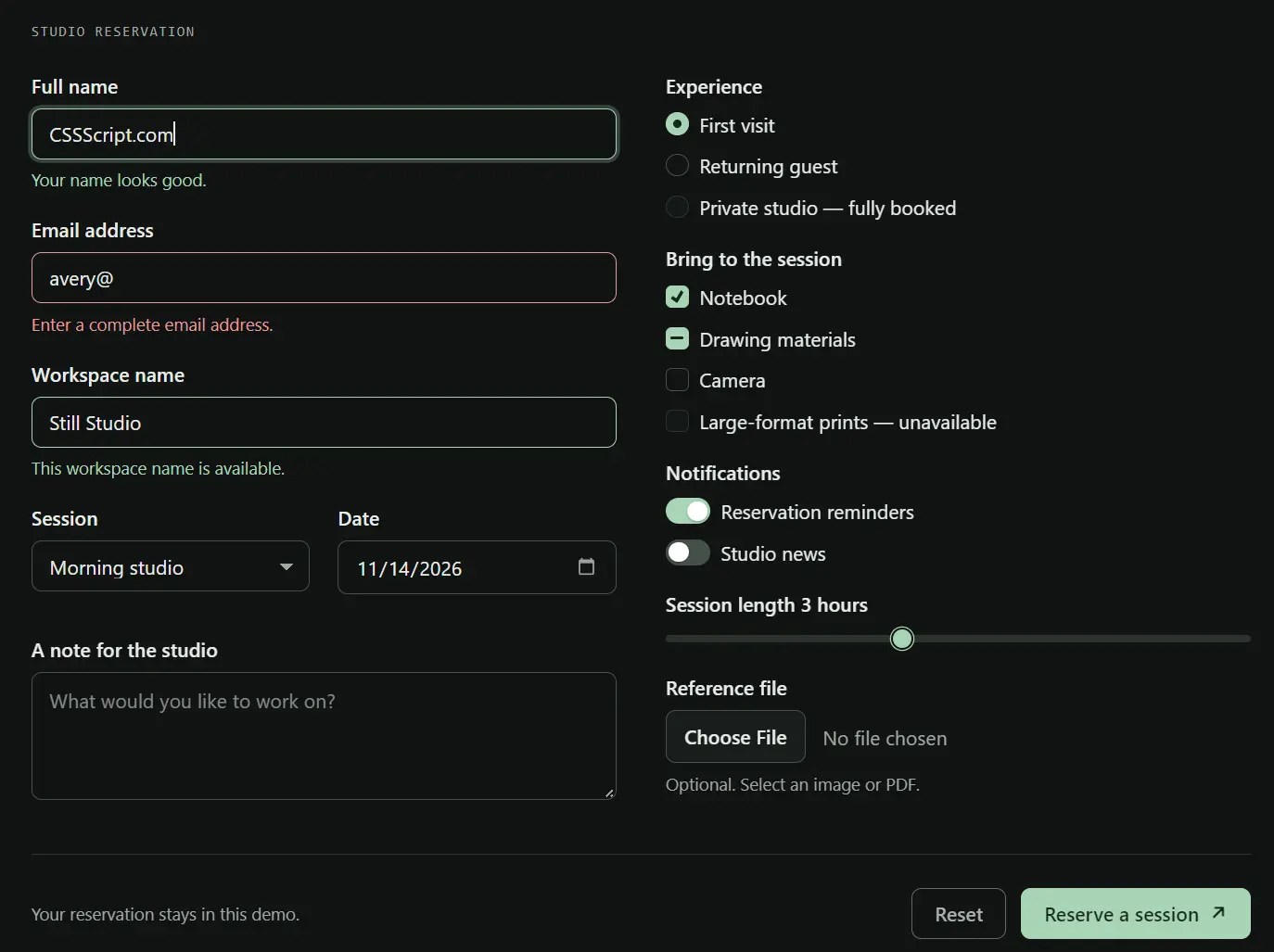
Sumi.css is a classless-first CSS framework that styles semantic HTML with a single stylesheet. It styles native content and controls by default, and optional classes handle responsive layouts and component variations.
The framework follows system light and dark themes, and CSS custom properties control the page’s colors, typography, and spacing. No JavaScript or build step is required.
Features
- Responsive grids with auto-fitting columns and fixed-column layouts.
- Primary, secondary, contrast, and outlined buttons.
- Form controls with validation colors and visible focus indicators.
- Styled native dialogs, accordions, and dropdown menus.
- CSS tooltips, callouts, and loading indicators.
- Fluid heading sizes and optional serif typography.
- Reduced-motion preferences and print styles.
- Custom colors, typography, spacing, and component dimensions through CSS variables.
How To Use It
Installation
Download sumi.min.css or link the stylesheet from a CDN. Place it in the document’s <head> section.
<link rel="stylesheet" href="https://cdn.jsdelivr.net/gh/vladocar/Sumi.css/sumi.min.css">
Basic Usage
Sumi.css applies its default styles to semantic HTML. Place <header>, <main>, and <footer> directly inside <body> to receive centered page widths automatically.
<body>
  <header>
    <nav>
      <ul><li><strong>Studio Notes</strong></li></ul>
      <ul>
        <li><a href="#home" aria-current="page">Home</a></li>
        <li><a href="#contact">Contact</a></li>
      </ul>
    </nav>
  </header>
  <main id="home">
    <h1>A Simple Project Page</h1>
    <p class="lead">Updates and resources from our design studio.</p>
    <article>
      <h2>Latest Update</h2>
      <p>Our autumn workshop schedule is now available.</p>
      <a href="#contact" role="button">Get in touch</a>
    </article>
  </main>
  <footer id="contact"><p>Contact: [email protected]</p>    </footer>
</body>
Native HTML Elements
Sumi.css styles these HTML elements directly. A class is only needed for a specific variant or layout.
| Element | Default styling |
|---|---|
h1 to h6, p, ul, ol, blockquote | Responsive typography and spacing. |
nav with ul groups | Horizontal navigation, or vertical navigation inside aside. |
button, a[role="button"] | Primary buttons with hover and focus states. |
input, select, textarea, fieldset, label | Form fields, labels, and focus styles. |
| Checkbox, radio, range, file, and color inputs | Theme-colored native form controls. |
table | Full-width table with row dividers. |
article | Card with styled direct header and footer elements. |
details and summary | Expandable disclosure panel. |
dialog | Styled native modal and backdrop. |
progress and meter | Styled progress and measurement bars. |
UI Components
A grid can hold cards with native disclosure panels and CSS dropdowns. A dropdown uses <details class="dropdown">, and .right can align its menu to the right.
<div class="grid">
  <article id="workshop">
    <header><strong>Workshop Details</strong></header>
    <p>Saturday, 10 AM. All materials are included.</p>
    <label for="attendee">Your name</label>
    <input id="attendee" name="attendee" autocomplete="name">
  </article>
  <article id="resources">
    <header><strong>Common Questions</strong></header>
    <details>
      <summary>Can I change my booking?</summary>
      <p>Contact the studio before the session.</p>
    </details>
    <details class="dropdown">
      <summary>Jump to a section</summary>
      <ul>
        <li><a href="#workshop">Workshop details</a></li>
        <li><a href="#resources">Questions</a></li>
      </ul>
    </details>
  </article>
</div>
For a modal, Sumi.css styles the native <dialog> element and its backdrop. Your application must open the dialog with browser JavaScript. A form with method="dialog" closes it using the native dialog behavior.
<button type="button" id="open-confirmation">Open confirmation</button>
<dialog id="confirmation">
  <article>
    <header><h3>Submit your request?</h3></header>
    <p>Review the information before continuing.</p>
    <footer>
      <form method="dialog" class="row">
        <button value="cancel" class="secondary outline">Cancel</button>
        <button value="confirm">Confirm</button>
      </form>
    </footer>
  </article>
</dialog>
<script>
  const confirmation = document.querySelector('#confirmation');
  document.querySelector('#open-confirmation').addEventListener('click', () => {
    confirmation.showModal();
  });
</script>
Responsive Layouts
.grid creates auto-fitting columns with a default minimum width of 14rem. Fixed layouts use .cols-2, .cols-3, .cols-4, .cols-6, or .cols-12 from a viewport width of 48rem. These fixed layouts switch to one column below that breakpoint.
Available span modifiers: .span-2, .span-3, .span-4, .span-6, .span-8, .span-9, and .span-full.
<div class="grid" style="--s-grid-min: 12rem">
  <article>First card</article>
  <article>Second card</article>
  <article>Third card</article>
</div>
<div class="grid cols-12">
  <section class="span-8">Main content</section>
  <aside class="span-4">Sidebar content</aside>
</div>
Light And Dark Themes
Sumi.css selects its palette through prefers-color-scheme. Set data-theme="light" or data-theme="dark" on <html> to choose a fixed theme. The attribute also works on an individual element.
<html lang="en" data-theme="dark">
A theme toggle needs a small JavaScript handler. This example stores the visitor’s choice in local storage. It expects the button after the HTML content has loaded.
If you need the saved theme applied before the first paint, read local storage and set data-theme in the document’s <head> before loading the stylesheet.
<button type="button" id="theme-toggle">Switch theme</button>
<script>
  const root = document.documentElement;
  const savedTheme = localStorage.getItem('theme');
  if (savedTheme === 'light' || savedTheme === 'dark') {
    root.dataset.theme = savedTheme;
  }
  document.querySelector('#theme-toggle').addEventListener('click', () => {
    const systemDark = matchMedia('(prefers-color-scheme: dark)').matches;
    const current = root.dataset.theme || (systemDark ? 'dark' : 'light');
    const next = current === 'dark' ? 'light' : 'dark';
    root.dataset.theme = next;
    localStorage.setItem('theme', next);
  });
</script>
Styling And Customization
Load your own stylesheet after Sumi.css to override the default tokens. Color overrides intended for both themes need equivalent light and dark definitions, since Sumi.css assigns its dark colors through separate selectors and a system-preference media query.
-root,
[data-theme="light"] {
  --s-primary: #0f766e;
  --s-radius: .25rem;
  --s-font-heading: Georgia, serif;
  --s-container: 64rem;
}
-root[data-theme="dark"],
[data-theme="dark"] {
  --s-primary: #5eead4;
}
@media (prefers-color-scheme: dark) {
-root:not([data-theme="light"]) {
    --s-primary: #5eead4;
  }
}
CSS Classes And Modifiers
These classes control layout, typography, components, and small utility behaviors. Grid spans apply at the 48rem breakpoint for the fixed-column layouts.
Layout Classes
| Class | Description |
|---|---|
.container | Centers a block within the --s-container width. |
.container-fluid | Uses an uncapped width and horizontal gutters. |
.narrow | Restricts content to --s-narrow. |
.grid | Creates auto-fitting CSS Grid columns. |
.cols-2, .cols-3, .cols-4, .cols-6, .cols-12 | Set fixed column counts at 48rem and above when used with .grid. |
.span-2, .span-3, .span-4 | Occupy two, three, or four grid tracks at 48rem and above. |
.span-6, .span-8, .span-9 | Occupy six, eight, or nine grid tracks at 48rem and above. |
.span-full | Occupies all tracks in a grid row. |
.row | Flexible row with wrapping and alignment. |
.spread | Distributes space between items when used with .row. |
.stack | Vertical flex layout. |
Typography Classes
| Class | Description |
|---|---|
.display | Large display-sized heading. |
.lead | Larger introductory text. |
.prose | Reading width and long-form typography. Removes the card appearance from <article>. |
.serif | Applies the configured serif typeface. |
Component Classes
| Class | Description |
|---|---|
.secondary | Secondary button colors. |
.contrast | High-contrast button colors. |
.outline | Outlined button variant. |
.small, .large | Compact or large button sizes. |
.full | Full-width button or element. |
.dropdown | Dropdown styling for <details>. |
.right | Right-aligns a .dropdown panel. |
.callout | Styled status or information block. |
.success, .warning, .danger | Callout color variants when paired with .callout. |
.striped | Alternating rows on <table>. |
Utility Classes
| Class | Description |
|---|---|
.muted | Secondary text color. |
.small | Reduced font size. |
.center | Centered text. |
.full | Full element width. |
.overflow-auto | Automatic overflow scrolling. |
.sr-only | Hides content visually while retaining it for assistive technologies. |
HTML Attributes And States
| Attribute | Description |
|---|---|
role="button" | Styles a link as a button. |
role="group" | Connects adjacent buttons or form fields into a joined group. |
role="switch" | Styles a checkbox as a switch. |
aria-invalid="true" | Displays an invalid-field state. |
aria-invalid="false" | Displays a valid-field state. |
aria-busy="true" | Shows a CSS loading spinner on eligible elements. |
aria-current="page" | Highlights the active navigation link. |
aria-disabled="true" | Styles button-like elements as disabled. Application code must prevent disabled link activation. |
data-tooltip="..." | Displays text in a CSS tooltip on hover or focus. |
data-placement="bottom" | Moves the tooltip below the element. |
data-theme="light", data-theme="dark" | Selects a fixed color theme on a root or section. |
aria-label="breadcrumb" on <nav> | Applies breadcrumb separators to list items. |
open on <details> or <dialog> | Uses the element’s native open state for the appropriate component styling. |
CSS Custom Properties
Typography And Text Tokens
| CSS variable | Description |
|---|---|
--s-font-sans | Sans-serif font stack. |
--s-font-mono | Monospace font stack. |
--s-font-serif | Serif font stack. |
--s-font-body | Body font family, initially the sans-serif stack. |
--s-font-heading | Heading font family. |
--s-font-size | Base font size before fluid scaling, default 100%. |
--s-line-height | Base line height, default 1.6. |
--s-heading-weight | Heading weight, default 700. |
--s-measure | Reading measure for .prose, default 68ch. |
--s-flow | Spacing after text blocks, default 1.25rem. |
--s-text-display | Fluid display headline size. |
--s-text-h1 | Fluid first-level heading size. |
--s-text-h2 | Fluid second-level heading size. |
--s-text-h3 | Fluid third-level heading size. |
--s-text-h4 | Fluid fourth-level heading size. |
--s-text-lead | Fluid .lead text size. |
Layout, Spacing, And Effects Tokens
| CSS variable | Description |
|---|---|
--s-space | Spacing after forms and components, default 1rem. |
--s-gutter | Responsive horizontal page gutter. |
--s-container | Main container width, default 72rem. |
--s-narrow | Narrow content width, default 44rem. |
--s-radius | Common corner radius, default .5rem. |
--s-transition | Component transition timing, default .15s ease. |
--s-shadow | Standard component shadow. |
--s-shadow-lg | Larger modal shadow. |
--s-grid-min | Minimum auto-fit column width, default 14rem. |
--s-grid-gap | Grid spacing, defaulting to --s-space. |
--s-row-gap | Gap between .row items, default .75rem. |
--s-stack-gap | Gap between .stack items, defaulting to --s-space. |
Color Tokens
| CSS variable | Description |
|---|---|
--s-bg | Page and surface background. |
--s-surface | Muted surface color for controls and striped rows. |
--s-card | Card background. |
--s-card-section | Card header and footer background. |
--s-text | Primary text color. |
--s-muted | Secondary text color. |
--s-border | Standard borders and rules. |
--s-border-strong | Emphasized borders. |
--s-primary | Primary links, actions, and selected controls. |
--s-on-primary | Text on the primary button color. |
--s-secondary | Secondary button color. |
--s-on-secondary | Text on secondary buttons. |
--s-contrast | Contrast button and tooltip background. |
--s-on-contrast | Text on contrast buttons and tooltips. |
--s-success | Success and valid state color. |
--s-warning | Warning state color. |
--s-danger | Danger and invalid state color. |
--s-code-bg | Inline code background. |
--s-mark-bg | Highlighted text background. |
--s-mark-text | Highlighted text foreground. |
--s-mix | Color mixed into component hover states. |
--s-focus | Focus ring tint. |
Alternatives And Related Resources
- Minimal Clean CSS Design System – Pico.css
- Minimal Elegant CSS Framework – Water.css
- Minimalist CSS Framework For Web Design – MVP.css
- Classless CSS Framework with Georgia & Verdana Typography System – MCSS
- Accessible Themeable Pure CSS Framework – µCSS
See Also:
 Lightweight & Semantic UI Component Library – Oat UI
 Classless Themeable CSS Framework For Modern Web Design – Dev.css
 CSS Framework With Almost No Classes – no.css
 Monospace UI Framework for Grid-Aligned Interfaces – ASTA Design System
 Classless CSS Framework with Georgia & Verdana Typography System – MCSS
 Minimal Classless CSS Framework – Simple.css
 Zero-Class Web Development with launch.css Framework
 Responsive Classes CSS Framework – Prime.css