


AsPopup.js is a beautiful and highly customizable popup JavaScript library to help developers implement modal windows, loading indicators, toast messages, and alert/confirm/prompt dialogs on their web apps.
Feel free to use this popup library on e-commerce sites to display promotional offers, or on blogs to highlight subscription forms. It is also perfect for feedback forms, age verification prompts, or even loading indicators that keep users informed without detracting from the user experience.
How to use it:
1. Download the package and import the popup.js script into your project.
<script src="popup.js"></script>
2. Create popup boxes using the popup() method.

as.popup({
  title: "Popup Title",
  text: "Popup Content",
  // success, error, warning
  // info, question, or custom icon URL
  icon: "success",
  // optional emoji
  emoji: "😍",
  // display an image inside the popup
  image: "1.jpg",
  imageHeight: 400,
  imageWidth: 600,
  imageAlt: "An image.",
  // display any HTML content inside the popup
  html: document.getElementById("html-example"),
  script: "any script here",
  // show/hide Close controls
  closeBtn: false,
  closeIcon: true,
  overlayClick: false,
  // top-left, top-center, top-right
  // bottom-left, bottom-center, bottom-right
  position: "top-center",
  // background
  background: "url('bg.jpg') center",
  overlayBackground: "rgba(0,54,255,0.3)",
  // text
  font: "Inter",
  titleSize: 30,
  textSize: 20,
  // popup width
  width: 250,
  // popup padding in px
  padding: "30px",
  // custom action buttons
  buttons: [
    {
      html: "Button 1",
      type: "success", // "success", "error", "warning", "info", "question", "dark"
      close: true,
      id: "",
      bg: "rgba(0,54,255,0.3)",
      color: "#fff",
      click: function(){
        // do something
      },
    },
    // more buttons here
  ]

});
3. Create toast messages using the toast() method.

as.toast({
  title: "Toast Message",
  // auto-dismiss after this timeout
  timer: 2500,
  // dismiss the toast on click
  clickToClose: true,
  // success, error, warning
  // info, question
  type: "success",
  // top-left, top-center, top-right, bottom-left, bottom-center, bottom-right
  position: "top-center",

});
4. Create loading indicators using the loader() method.
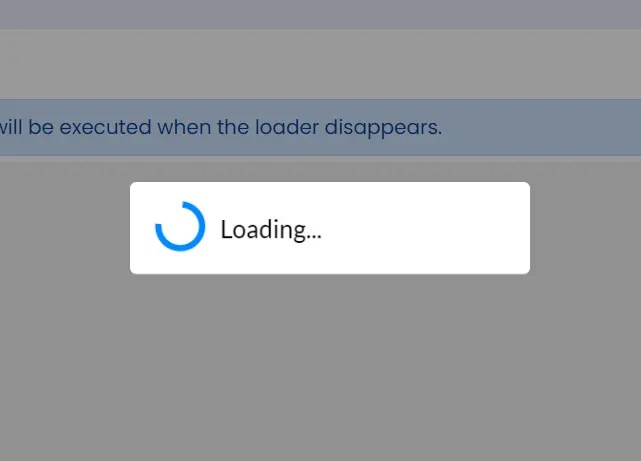
var loader = as.loader();
loader.show({
  title: "Loading..."
  timer: 3000,
  onHide: function(){
    // do something
  }
});
loader.hide(function (){
  // do something
});
5. Create alert boxes using the alert() method.
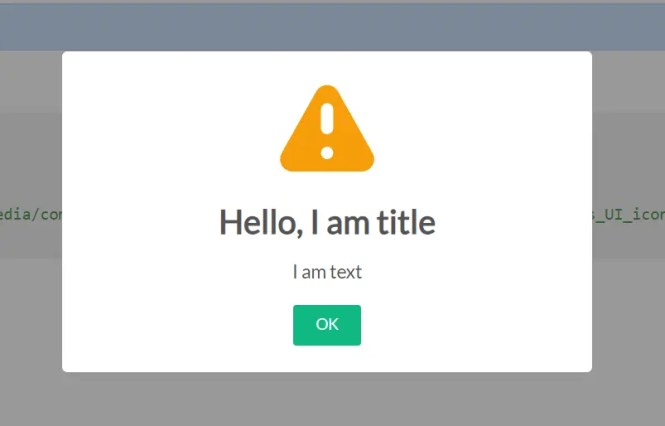
as.alert({
  title: "Alert Title",
  text: "Alert Message",
  // show/hide alert icon
  icon: false,
  // add an image to the alert
  image: "1.png",
});
6. Create confirmation dialogs using the confirm() method.

as.confirm({
  title: "Confirm Title",
  text: 'Confirm Message',
  // show/hide confirm icon
  icon: false,
  // add an image to the confirm dialog
  image: "1.png",
  okBtnHtml: "Yes",
  cancelBtnHtml: "No",
  // callbacks
  onConfirm: function(){
    // do something
  },
  onCancel: function(){
    // do something
  }

});
7. Create prompt dialogs using the prompt() method.

as.prompt({
  title: "Prompt Title",
  text: "Prompt Message",
  icon: true
});
See Also:
 Create iOS-Style Popups & Notifications With Popup JS Library
 JavaScript Wrapper For Bootstrap 5 Modals – Modbox
 Notification/Dialog/Loading Indicator JavaScript Library – Fnon
 Lightweight Customizable Modal and Alert Library – SilverBox.js
 Pure JavaScript Toast & Dialog Popup Library – Alerty
 Pretty Non-blocking Dialog Popup JavaScript Plugin – Prompt-Boxes
 Lightweight JavaScript Notification System – Simple Display Alert
 Create Custom Stylish Dialogs with SnapDialog JavaScript Library